
Publishing creative content on social media is only half the battle. You can post beautiful graphics, write witty captions, and follow every trending audio, but if you do not measure how your content performs, you are essentially driving blindfolded.
Understanding social media analytics is what separates amateur content creators from strategic digital operators. Data tells you exactly what your target audience likes, what they ignore, and where your time and energy are best spent.


Whether you are running a personal brand, managing clients as a freelancer, or overseeing a corporate marketing strategy, this beginner’s guide will demystify social media analytics and give you a simple, repeatable framework for reporting.
What is Social Media Analytics?
Social media analytics is the process of collecting, tracking, and analyzing performance data from your social media channels to evaluate the success of your strategy.
It involves gathering raw numbers—such as post views, clicks, comments, and shares—and translating them into actionable business insights. Instead of guessing what your audience wants, analytics provides empirical proof of user behavior.
Properly executed analytics allows you to answer critical questions:
- Which platform is generating the highest return on investment (ROI)?
- What time of day is your audience most active and responsive?
- Which content formats (videos, carousels, link posts) drive actual website traffic?
- Are your marketing campaigns attracting the right target demographic?
Vanity Metrics vs. Actionable Metrics: Understanding the Difference
Before diving into specific data points, every beginner must learn to distinguish between two fundamental categories of data: Vanity Metrics and Actionable Metrics.
Vanity Metrics
Vanity metrics are surface-level numbers that are easy to track and make you feel good, but they do not directly correlate with business growth or sales.
- Examples: Raw follower count, total post likes, and page impressions.
- The Trap: An account can have 100,000 followers, but if nobody buys their product or clicks their links, those followers hold little practical commercial value.
Actionable Metrics
Actionable metrics are deeper data points that reflect genuine interest, audience intent, and user conversion.
- Examples: Click-through rate (CTR), engagement rate by reach, conversion rate, and saves/shares.
- The Value: These metrics prove whether your content is inspiring people to take real action, such as visiting your blog or signing up for a newsletter.
To build a successful website and brand, your analytical focus must always prioritize actionable metrics over vanity numbers.
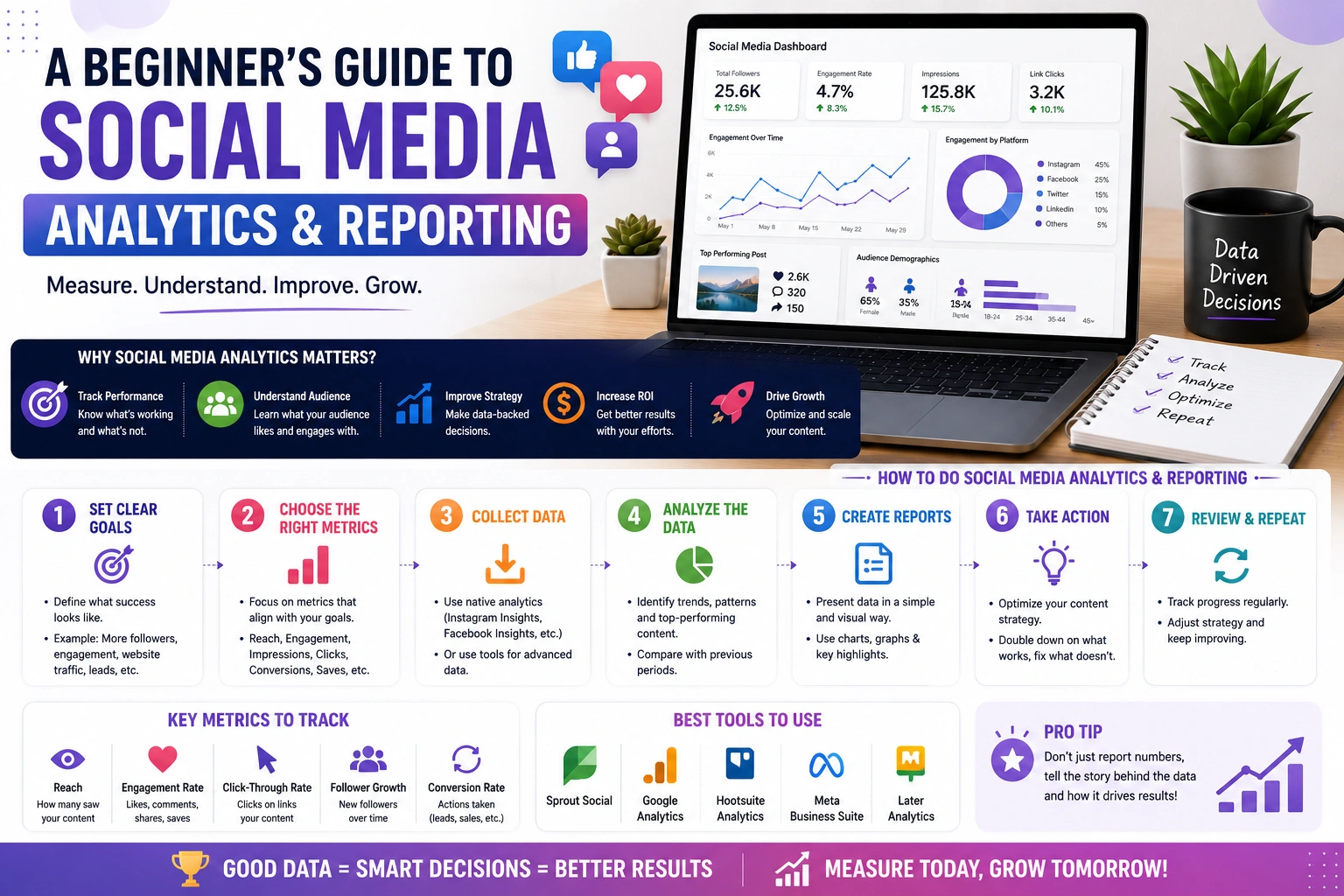
5 Essential Social Media Metrics Every Beginner Must Track
While social platforms offer hundreds of different data points, beginners should start by mastering these five primary metrics:
1. Engagement Rate
Engagement rate measures how actively your audience interacts with your content relative to your audience size or total reach. It includes actions like comments, shares, saves, and clicks.
- Why It Matters: High engagement indicates that your content deeply resonates with your audience. Algorithms reward high engagement rates by pushing your posts to new users.
- Standard Formula: $\text{Engagement Rate} = \left(\frac{\text{Total Engagements}}{\text{Total Reach or Impressions}}\right) \times 100$
2. Reach vs. Impressions
These two terms are frequently confused, but they measure distinct aspects of exposure:
- Reach: The unique number of individual accounts that saw your post. If one person sees your post three times, your reach is 1.
- Impressions: The total number of times your post was displayed on a screen, regardless of whether it was clicked or seen by the same person multiple times.
- Why It Matters: Tracking reach tells you if your brand awareness is growing, while impressions help you understand how frequently your content stays in front of people.
3. Click-Through Rate (CTR)
Click-Through Rate measures the percentage of people who saw your post and clicked on the link embedded within it (such as a link in bio or a website post link).
- Why It Matters: For publishers and website operators, CTR is arguably the most critical metric. It measures how effectively your social media content drives actual referral traffic to your website.
4. Saves and Shares
When a user saves your post to a collection or shares it via direct message or to their own story, they are providing a massive signal of value.
- Why It Matters: Saves indicate high educational utility (the user wants to revisit the information), while shares indicate viral potential (the user finds the content valuable enough to advocate for it publicly).
5. Conversion Rate
Conversion rate tracks the percentage of social media users who complete a desired action after landing on your website—such as subscribing to an email list, downloading a resource, or making a purchase.
- Why It Matters: This is the ultimate measure of ROI. It proves whether your social media efforts are generating tangible business results.
Step-by-Step Process to Build a Social Media Analytics Report
Creating a monthly or weekly social media report allows you to spot long-term trends and present your results clearly to stakeholders or clients. Here is a simple 5-step framework:
Step 1: Define Clear Key Performance Indicators (KPIs)
Never start collecting data without a clear goal. Align your metrics with your primary business objective:
- Goal: Brand Awareness $\rightarrow$ Track Reach, Impressions, and Follower Growth Rate.
- Goal: Community Building $\rightarrow$ Track Comments, Saves, and Engagement Rate.
- Goal: Website Traffic $\rightarrow$ Track Clicks, Referral Traffic, and CTR.
Step 2: Utilize Native Platform Analytics Tools
You do not need expensive enterprise software to gather data. Most platforms offer robust, built-in analytics suites for free:
- Meta Business Suite: Tracks detailed demographic data, audience insights, and performance across both Facebook and Instagram.
- LinkedIn Analytics: Provides rich b2b data, including visitor job titles, industries, and company sizes.
- Google Analytics 4 (GA4): Essential for tracking what social media visitors do after they click through to your website.
Step 3: Establish Benchmarks and Tracking Schedules
Data is meaningless without context. To evaluate if a campaign was successful, compare it against your historical baseline (your average performance over the past 30 or 90 days). Set up a regular schedule—either bi-weekly or monthly—to pull your data.
Step 4: Extract Trends and Patterns
Look beyond individual numbers and search for underlying patterns across your top-performing content:
- Did carousel posts generate more saves than single images?
- Did posts published on Tuesday mornings yield higher CTRs than those on weekends?
- Which topics consistently generate thoughtful comment discussions?
Step 5: Translate Data into Strategy Adjustments
The final and most important step of reporting is taking action. A good report does not just present numbers; it recommends next steps based on those numbers.
- Data Insight: “Video content generated 40% higher reach, but link posts generated 30% more website traffic.”
- Strategic Adjustment: “Maintain a hybrid schedule of 60% short-form video for audience growth and 40% educational carousels for driving traffic to the website.”
Final Thoughts on Social Media Analytics
Data should inform your creativity, not extinguish it. While keeping a close eye on metrics and reporting is essential for strategic growth, remember that behind every click, save, and impression is a real human being.
By consistently tracking actionable metrics, identifying content trends, and refining your publishing strategy, you can build an efficient, data-driven system that scales your digital footprint reliably over time.

